
Create a Trading Profile
Set up a trading profile for your token with DEX and chain configuration.
A trading profile is how you configure Sumo for a specific token. Each profile defines which token you're trading, which chain and DEX to use, and your execution preferences. You can create multiple profiles for different tokens or different configurations of the same token.
Create a New Profile
- From the dashboard, click Import Token
- Complete Token Info with your profile name, token address, routing fields, and execution defaults
- Click Continue to resolve the token details before moving to Wallet Setup
- Complete Wallet Setup by creating wallets, importing keys, copying wallets from Wallet Farm, or copying wallets from another profile
- Optionally add starter strategies in Strategies
- Review the final preview and click Import
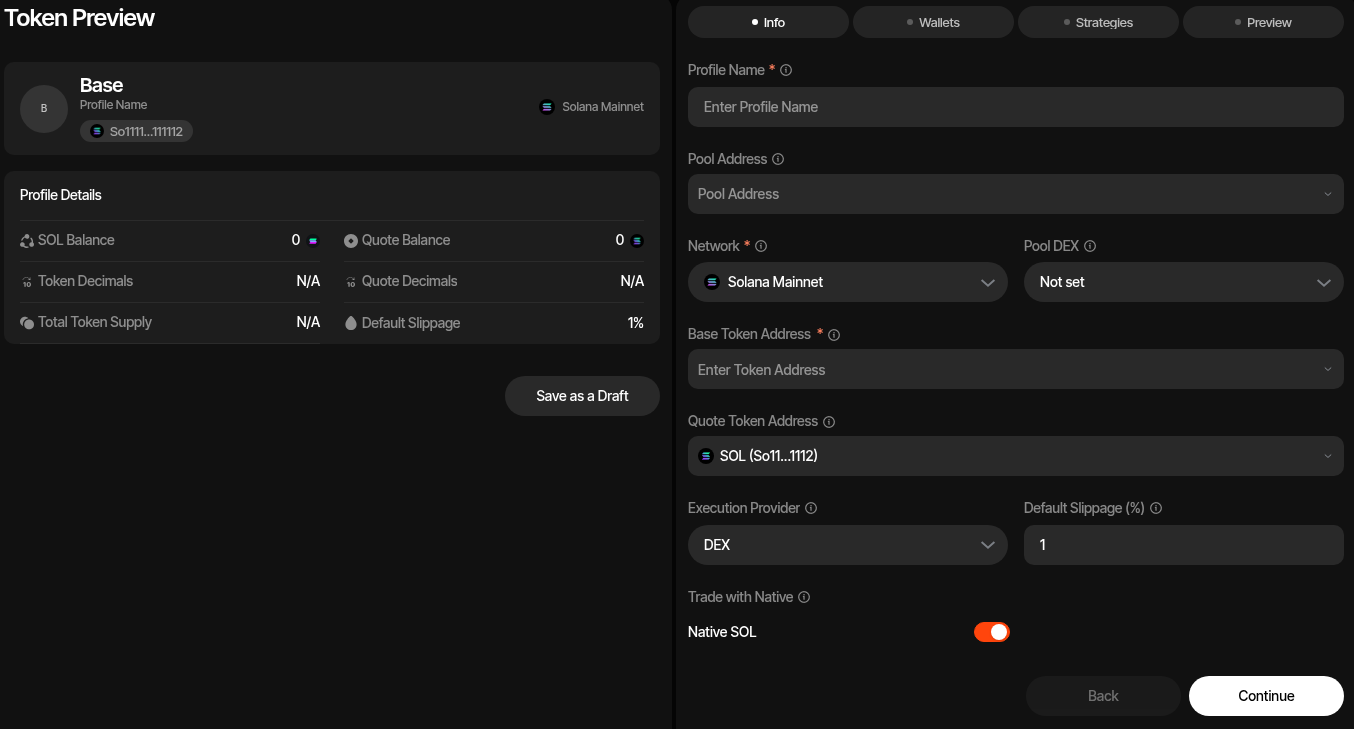
Import Token Flow
The import flow creates the trading profile and its initial wallet setup together. If you include a pool address and DEX, the profile is created as an active trading profile. If you only enter the token information, Sumo saves a draft profile that you can finish later from Profile Settings.
Token Info
Token Info defines what token Sumo will track, how it should price the token, and which execution route the profile should use. The base token address is required. The quote token defaults to the chain's wrapped native asset unless you choose another quote token.
Wallet Setup
Wallet Setup decides which wallets are attached to the new profile:
- Create New — Generate one or more new wallets
- From Farm — Move Wallet Farm wallets into this profile
- From Profile — Copy wallets from another profile in the same organization
- Import Keys — Import existing private keys
If you create a wallet group in this step, the imported wallets are added to that group as part of the same import.
Strategies
You can create Counter Trade, DCA, and Limit Order strategies before importing. These starter strategies are created inactive and target all wallets by default, so you can review wallet assignments and settings before activating them.
Profile Fields
Profile Name
Give your profile a descriptive name, e.g. "MYTOKEN Market Making" or "MYTOKEN DCA".
Pool Address
Paste the on-chain pool address (or pool ID) for your token's liquidity pool. Sumo automatically resolves the pool and fills in the DEX, base token, and quote token for you.
Smart Pool Resolution
When you paste a pool address, Sumo detects the DEX, identifies both tokens in the pair, and fetches token metadata (symbol, decimals, image) — all automatically.
Network
Select the blockchain network where your token lives. Sumo supports:
- Solana Mainnet
- Ethereum
- BNB Smart Chain
- Base
- Ethereum Sepolia (testnet)
Pool DEX
Automatically set when you resolve a pool address. You can also select manually. See Supported DEXes for the full list.
Base Token & Quote Token
These are resolved automatically from the pool address. The base token is your project's token and the quote token is the asset it's paired against (e.g. SOL, WETH, WBNB).
You can also enter token addresses manually if you're not using pool resolution.
Execution Provider
Choose how trades are routed:
- DEX (default) — Trades execute directly on the selected pool
- Aggregator — Trades route through a DEX aggregator for best-price execution (e.g. Jupiter, 0x). Some aggregators charge a small additional fee on top of the trade.
If your token trades on a single pool, DEX is recommended — it's direct and fee-free. If your token has significant liquidity across multiple pools, an Aggregator can find better prices through cross-pool routing, even accounting for the small additional fee.
See Supported Aggregators for available options per chain.
Default Slippage
Maximum slippage tolerance for trades, in percent. Default is 1%. Individual strategies can override this.
Trade with Native
When enabled, Sumo trades with the chain's native asset (SOL, ETH, BNB) instead of its wrapped version. Enabled by default.
Preview & Import
As you complete Token Info and Wallet Setup, the preview pane shows the profile summary that will be created:
- Token symbol, profile name, token address, quote address, pool address, and network
- Native balance and quote balance across the wallets selected for import
- Token and quote decimals
- Total token supply
- Default slippage
The final preview summarizes the profile, wallets, balances, and starter strategies. Review the details and click Import to finalize. You'll be taken to the Live Trading page for the new profile.