
Counter Trade
Sumo's flagship strategy that counters external trades to maintain price stability.
Counter Trade is Sumo's flagship strategy. It monitors your token's pool for external trades and automatically executes a counter-trade to offset the price impact — buying when others sell, and selling when others buy.
How It Works
- Sumo watches your token's pool for external trades in real time
- When a trade exceeds your trigger threshold, Sumo calculates a counter-trade
- The counter-trade executes from your wallets, offsetting the price movement
- MEV bots are automatically excluded (when enabled) to avoid counter-trading against bots
Strategy Types
Counter Trade has two directions:
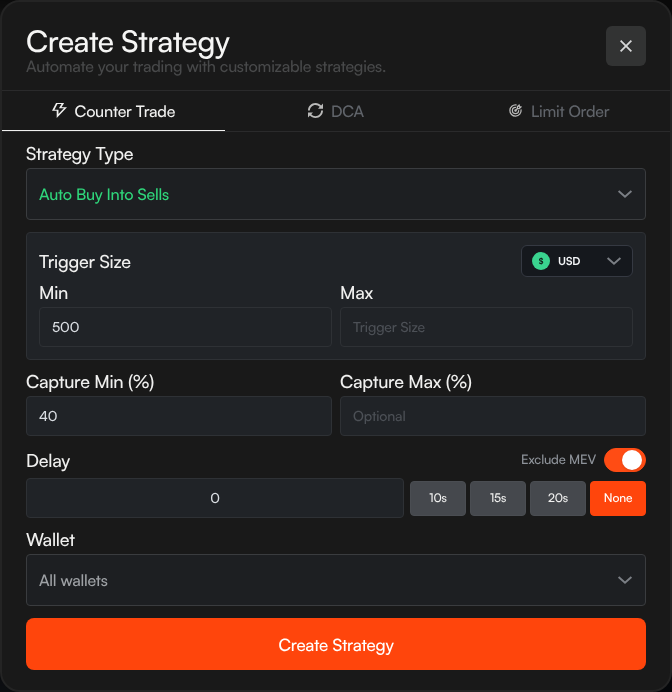
- Auto Buy Into Sells — When someone sells your token, Sumo automatically buys to support the price
- Auto Sell Into Buys — When someone buys your token, Sumo automatically sells to take profit or manage supply
You can run both simultaneously to maintain a tight price range.
Configuration
Trigger Size
The minimum (and optional maximum) external trade size that triggers a counter-trade. You can set this in:
- USD — Dollar value of the trade
- Quote (e.g. SOL, WETH, WBNB) — Quote asset amount
- Token — Number of tokens traded
| Field | Description |
|---|---|
| Min | Minimum trade size to trigger a counter (required) |
| Max | Maximum trade size to counter (optional — leave empty for no cap) |
Filter Out Noise
Set the minimum trigger high enough to ignore small trades that don't meaningfully impact price. This keeps your wallets from being drained by dust trades.
Capture Percentage
How much of the detected trade to counter:
| Field | Description |
|---|---|
| Capture Min (%) | Minimum percentage of the trade to counter (required, 1–100%) |
| Capture Max (%) | Maximum percentage (optional — for a randomized range) |
For example, if someone sells $1,000 of your token and capture is set to 40%, Sumo buys back $400 worth.
Setting a capture range (e.g. 30–50%) randomizes the counter amount, making your trading pattern less predictable on-chain.
Delay
How long to wait after detecting a trade before executing the counter:
- None — Execute immediately
- 10s / 15s / 20s — Preset delays
- Custom — Enter any delay in seconds
A short delay can help avoid appearing as an obvious counter-trade on-chain.
Exclude MEV
When enabled, Sumo automatically identifies and ignores trades from known MEV bots. This prevents your strategy from counter-trading against sandwich attacks and other MEV activity.
MEV wallets are managed in Profile Settings — both manually added and auto-detected wallets.
Wallet
Choose which wallets execute the counter-trades:
- All wallets — Rotate across all active wallets
- Wallet group — Use wallets from a specific group
- Individual wallet — Use a single wallet
Slippage
Set the maximum price movement Sumo should allow for each counter-trade. Use a tighter value when you want stricter execution, and a wider value when fast execution matters more than exact output.
Private Relay
On supported EVM profiles, you can enable MEV protection using Private Relays. This routes eligible counter-trades through private relays to reduce public mempool exposure.
Strategy List View
Active counter trade strategies display:
| Column | Description |
|---|---|
| Trigger | The trigger range (e.g. "$500–$10,000") |
| Capture | Capture percentage or range (e.g. "40%" or "30–50%") |
| Delay | Execution delay (e.g. "15s" or "None") |
| Net Change | Cumulative base and quote asset changes from executed trades |
| Status | Whether the strategy is active, paused, completed, or failed |
Tips
- Start with Auto Buy Into Sells to support your token's price, then add Auto Sell Into Buys once you're comfortable
- Use a capture range (e.g. 30–50%) instead of a fixed percentage to make trades less predictable
- Enable Exclude MEV to avoid wasting funds counter-trading bots
- Set a reasonable trigger minimum to filter out small trades
- Pause the strategy before changing its settings
DCA
Schedule regular buys or sells at fixed intervals.
Impact Calculator
Estimate the price impact of a trade before executing.
Further Reading
- Counter Trading: Sell Tokens Without Hurting the Chart — how counter trading lets founders take profit without printing red candles
- What Is MEV and Why Do Token Teams Care? — what sandwich bots take from your trades and why Exclude MEV matters