
Wallets
Wallet Groups
Organize wallets into groups for batch operations and strategy assignment.

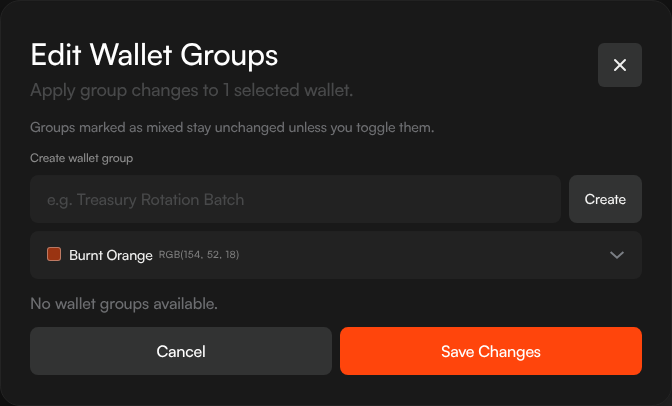
Wallet groups let you organize wallets into named, color-coded sets. Groups are used throughout Sumo for strategy assignment, treasury operations, and batch actions.
Why Use Groups
- Strategy isolation — Run Counter Trade on one group and DCA on another
- Treasury operations — Withdraw from or swap a specific group of wallets
- Visual organization — Color-coded indicators make it easy to identify wallets at a glance
- Launch bundles — Select a wallet group as buyer wallets for token launches
Creating a Group
During Wallet Creation
When generating or importing wallets, you can create a new group inline:
- Click Create New Group in the wallet creation modal
- Enter a group name
- Pick a color from the palette
- The new group is assigned to the wallets being created
From the Wallets Page
- Select one or more wallets using the checkboxes
- Click the Edit Wallet Groups button in the toolbar
- Create a new group or toggle existing groups on or off for the selected wallets
- Click Save Changes
Managing Groups
The Edit Wallet Groups modal shows all groups with:
- Color indicator
- Group name
- Member count
- Selection state relative to the selected wallets
Groups marked as mixed stay unchanged unless you toggle them. This makes it safe to bulk-edit several wallets without accidentally removing existing group assignments.
Groups in Strategies
When creating a strategy, the Wallet selector lets you choose:
- All wallets — Ignores groups, uses everything
- A specific group — Only wallets in that group participate
- An individual wallet — Single wallet only
Groups in Treasury
Treasury operations like Withdraw, Privacy Cashout, and Wrap/Unwrap also support filtering by wallet group.