
Wrap / Unwrap
Convert between native and wrapped assets in your wallets.

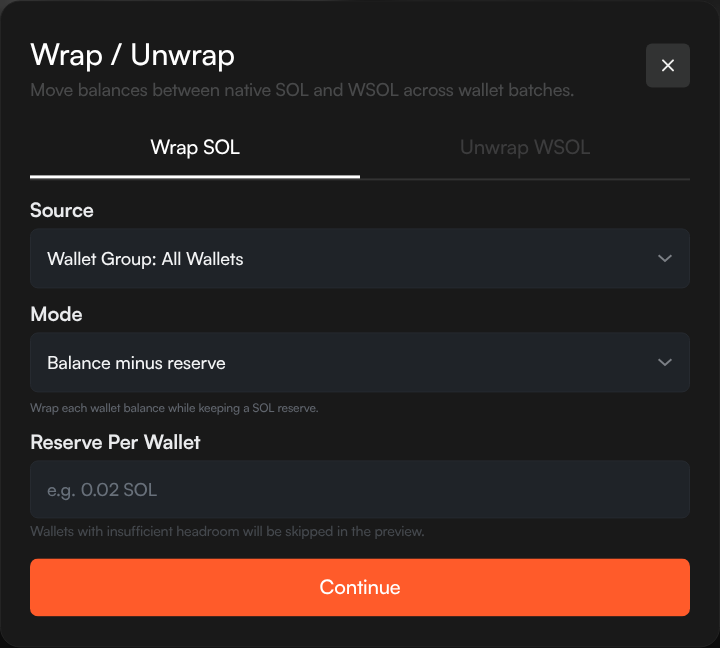
Wrap / Unwrap lets you convert between a chain's native asset and its wrapped version across wallet batches. For example, SOL to WSOL on Solana, or ETH to WETH on Ethereum.
Use it when a profile needs wrapped native liquidity for swaps, or when wrapped balances need to be returned to the native asset before another treasury action. The action appears when the profile trades with the wrapped asset instead of the native asset.
Supported Assets
| Chain | Native | Wrapped |
|---|---|---|
| Solana | SOL | WSOL |
| Ethereum | ETH | WETH |
| BNB Smart Chain | BNB | WBNB |
| Base | ETH | WETH |
| Robinhood Chain | ETH | WETH |
| Stable | USDT0 | WgUSDT |
| Tron | TRX | WTRX |
On Stable, wrap/unwrap converts between the chain's USDT0 gas asset and WgUSDT (wrapped gUSDT), the wrapped-gas token used by DYORSwap V2 pools. It is available for profiles trading a WgUSDT-quoted DYORSwap pool.
Wrap
Convert the native asset into its wrapped version in your wallets.
Wrap Modes
| Mode | Description |
|---|---|
| Balance minus reserve | Wraps each wallet's spare native balance after keeping the reserve amount for gas. Wallets without enough extra balance are skipped in preview. |
| Variable per wallet | Specify exact native amounts for individual wallets. |
How to Wrap
- Open the profile's Wallets tab
- Click Wrap / Unwrap from the wallet actions menu
- Select the Wrap tab
- Choose the source — all wallets, a wallet group, selected wallets, or one wallet
- Select a wrap mode:
- Balance minus reserve — Enter the amount to keep in each wallet for gas
- Variable per wallet — Enter exact amounts per wallet
- Click Continue to review the plan
- Click Wrap to execute
Unwrap
Convert the wrapped asset back to native.
Unwrap Modes
| Mode | Description |
|---|---|
| Unwrap all | Unwraps each selected wallet's full wrapped-native balance. |
| Variable per wallet | Specify exact wrapped-native amounts for individual wallets. |
How to Unwrap
- Open the profile's Wallets tab
- Click Wrap / Unwrap from the wallet actions menu
- Select the Unwrap tab
- Choose the source
- Select Unwrap all or Variable per wallet
- Click Continue to review the plan
- Click Unwrap to execute
Variable Amount Input
For variable mode, you can enter amounts in two ways:
- Interactive — Select wallets from a dropdown and enter amounts one by one
- CSV — Paste in format:
walletAddress,amount
The wallet address must belong to the selected source. Sumo also accepts the internal wallet ID, but wallet address is the normal format to use.
Preview
The preview shows how many wallets will be included, the total amount planned, skipped wallets, and per-wallet before/after balances. Review skipped wallets before confirming, especially when using Balance minus reserve.