
Import to Profile
Import prepared Wallet Farm wallets into a trading profile so they can participate in strategies and treasury operations.

Once your wallets are funded, have on-chain history, and a trading profile is ready, you can import wallets from Wallet Farm into the profile.
How to Import
There are two directions for importing wallets between Wallet Farm and profiles:
From Wallet Farm to a Profile
Use this flow when your wallets are prepared in Wallet Farm and you are ready to move them into a specific trading profile.
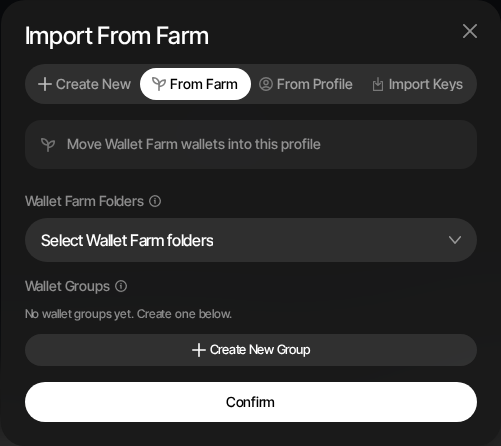
- Navigate to the target trading profile's Wallets tab
- Click + New Wallets
- Select the From Farm tab
- Choose one or more Wallet Farm folders or individual wallets. Turn on Include In Progress next to Wallet Farm Sources to import In Progress wallets alongside Ready ones
- Assign the imported wallets to an existing profile wallet group or create a new group
- Optionally turn on Keep in Wallet Farm to copy the wallets instead of moving them
- Click Confirm
Both toggles start off every time you import. The same toggles appear in the From Farm wallet step when you import a token or launch a new token.
From a Profile to Wallet Farm
If you have wallets in an existing profile that you want to manage centrally:
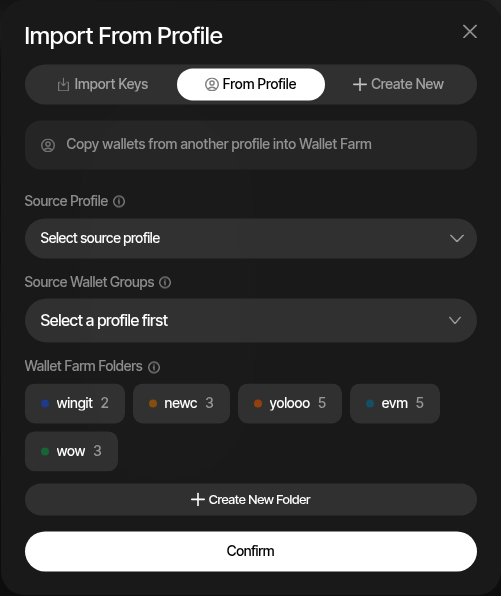
- Open Wallet Farm from the dashboard
- Click the + (Add wallets) button
- Select the From Profile tab
- Choose the source profile and source wallet groups
- Optionally assign the imported wallets to a Wallet Farm folder
- Click Confirm
What Happens on Import
Wallet Farm to a Profile
- Wallets move by default. Imported wallets are added to the profile and leave Wallet Farm.
- Keep in Wallet Farm copies them. With the toggle on, wallets are added to the profile and stay usable in Wallet Farm.
- Only Ready wallets by default. In Progress wallets are left out unless Include In Progress is on.
- Wallets already in the profile. With Keep in Wallet Farm on, wallets that already exist in the target profile are skipped. With it off, the import fails if any selected wallet already exists in the profile.
Kept Wallets Share Funds
A kept wallet is the same on-chain address in Wallet Farm and in the profile. Generate Activity, Withdraw, and Privacy Funding in Wallet Farm act on the balance that the profile's strategies trade with.
A Profile to Wallet Farm
- Wallets are cloned. Wallet Farm gets its own copy, and the profile wallet stays in place.
- No duplicates. Wallets that already exist in Wallet Farm are skipped.
Both Directions
- Same on-chain address. Imported wallets share the same public address and key material, so the on-chain balance and history are identical.
- Audit trail. Every import is logged with the source and wallet IDs for full traceability in Audit Logs.
Typical Workflow
A complete Wallet Farm preparation flow looks like this:
- Create wallets in Wallet Farm — Add Wallets
- Fund wallets using privacy-preserving providers — Privacy Funding
- Build on-chain history by swapping trending tokens — Generate Activity
- Wait for token launch — the token launches and a DEX pool is created
- Create a trading profile for the new token in Sumo
- Import wallets from Wallet Farm into the profile
- Start trading — wallets are funded, have history, and are ready to execute strategies