
Cross-Chain Swap
Move value between supported chains from project wallets or between Wallet Farm wallets.

Cross-Chain Swap moves value between wallets on different chains. Supported chains are Solana, Ethereum, BNB Smart Chain, Base, Stable, Robinhood Chain, and Tron. It is available in two places:
- Project Wallets — intended as a cross-chain cashout or withdrawal from a project wallet to an address on a different chain.
- Wallet Farm — intended for swapping between two Wallet Farm wallets on different chains inside the same organization.
Project Wallets
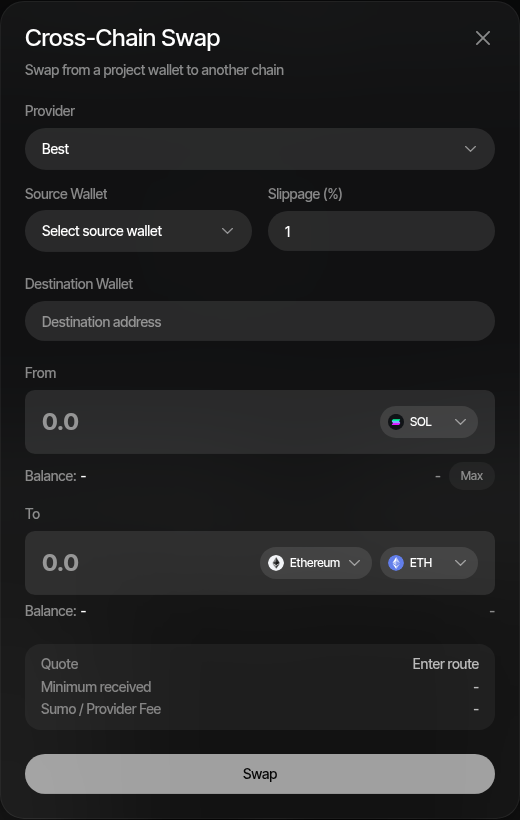
Use the project-scoped flow when funds are in a profile wallet and the destination is an external address on another chain. The destination chain must be different from the profile's chain.
- Open the profile's Wallets tab
- Open the wallet actions menu
- Click Cross-chain swap
- Choose the provider, or leave it as Best
- Select the source wallet
- Enter the destination address
- Enter the source amount and source asset
- Select the destination chain and destination asset
- Review the quote, minimum received, and total fee
- Click Swap
For EVM source chains, the modal can use private relay execution. For Solana source chains, Sumo builds the transaction with the normal Solana execution path used by the app.
Swapping from several wallets
Select more than one wallet on the Wallets tab before opening Cross-chain swap to send from all of them to one destination address. The modal keeps the single-wallet layout and adds:
- Source wallets — a multi-select seeded from the wallets you selected on the page
- Amount — Total (the default) splits the entered total across the wallets in proportion to their spendable balances (Max fills the combined spendable balance); Per wallet sends the entered amount from every wallet (Max sweeps each wallet's spendable balance)
- To — the expected output for the whole batch, net of fees, from one representative quote (the median-sized wallet at its own amount) that sets the provider and rate; wallets that cannot swap are counted in a note under the quote with the reason (no balance, insufficient balance, below minimum — a share too small for the provider's fixed cost is moved to the other wallets instead)
- Swap from N wallets — accepts the batch; the last quote stays usable while it refreshes
A batch is accepted immediately and its legs are submitted one at a time in the background: each leg is re-quoted on the batch's provider at its own amount (a runner-up provider is tried once when that provider refuses the leg), built, and submitted from its own wallet, then confirmed and tracked like a single swap. Legs appear individually in the Treasury logs with their batch, so a failed leg never holds up the others. Sumo paces provider requests so large batches stay under the providers' rate limits; execution time grows with the number of wallets, while the preview stays fast.
Wallet Farm
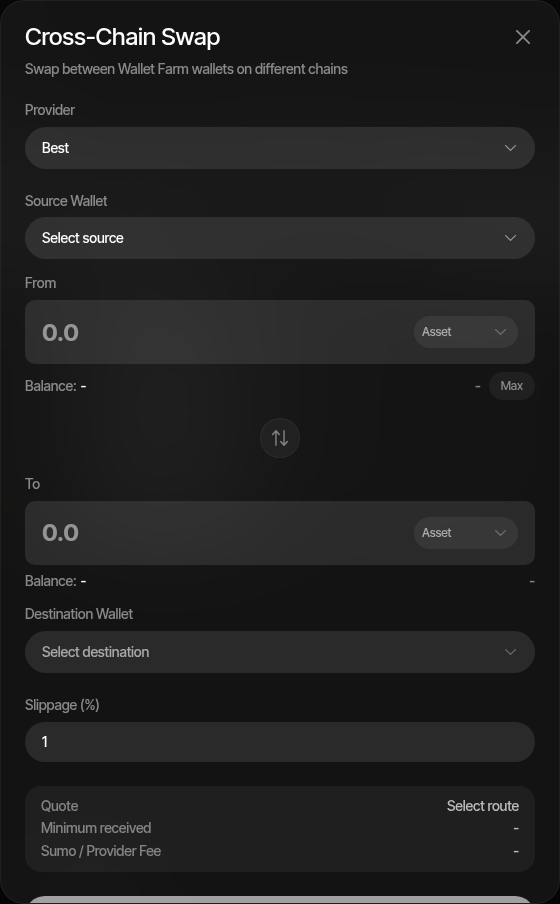
Use the Wallet Farm flow when both sides are Wallet Farm wallets and you want to move value between chains without first importing either wallet into a project.
- Open Wallet Farm
- Click Cross-Chain Swap
- Choose the provider, or leave it as Best
- Select the source Wallet Farm wallet
- Enter the source amount and asset
- Select the destination Wallet Farm wallet on a different chain
- Select the destination asset
- Review the quote, minimum received, and total fee
- Click Swap
Wallet Farm also includes a switch-direction button once both wallets are selected. The destination options are filtered to wallets on a different chain from the selected source wallet.
Select several Wallet Farm wallets on one chain before opening Cross-Chain Swap to send from all of them to one destination wallet. The multi-wallet controls (Per wallet / Total amounts, Max as sweep or combined balance, the per-wallet preview and Swap from N wallets) work as described for project wallets above; legs are submitted one at a time in the background and appear individually in the Wallet Farm activity logs.
Providers and Quotes
Cross-chain quotes can be requested from a specific provider — 0x, Relay, Mayan, or deBridge — or through Best. When Best is selected, Sumo compares supported providers and returns the best quote, with runner-up quotes available when multiple providers return valid routes.
Provider availability depends on the route: routes touching Stable use Relay; routes touching Robinhood Chain use 0x or Relay; routes touching Tron use 0x, deBridge, or Relay; other routes can use any provider.
The quote shows:
- Quote — selected provider and route summary
- Minimum received — the amount protected by the selected slippage setting (single-wallet swaps)
The To amount is the expected output after provider and Sumo fees.
Provider availability depends on the source chain, destination chain, and selected assets.
Source-Chain Gas
The source wallet pays its own source-chain fees, so Sumo keeps part of its native balance out of the swap:
- Native inputs — the balance shown and the Max button leave a reserve behind: 0.01 of the native asset on EVM chains, 0.02 SOL on Solana, and 100 TRX on Tron
- Token inputs on Solana and Tron — the source wallet needs at least 0.0065 SOL or 100 TRX for fees; otherwise the modal asks you to top up the wallet
Fees
Provider fees and the Sumo fee are already deducted from the expected output shown in the modal. Cashout fees configured for a project or organization are not applied to cross-chain swaps; when such fees exist, the modal shows a warning.
Logs and Notifications
After submission:
- Sumo records a Treasury audit log for the cross-chain swap
- The source transaction is submitted and confirmed
- A background job polls the provider until the destination side is complete or failed
- Logs and notifications are updated with the destination transaction link when available
For project-scoped swaps, the activity appears in the project's Treasury logs. For Wallet Farm swaps, the activity appears in Wallet Farm activity logs.
A multi-wallet batch adds one acceptance entry for the batch, then one entry per wallet as each leg is submitted (or fails before submission, with the reason).