
Limit Orders
Execute trades when market cap conditions are met.
Limit Orders execute trades when your token's market cap falls within a specified range. This lets you set up conditional buy and sell orders that trigger automatically based on market conditions.
How It Works
- You set a market cap range (min and/or max) and a trade amount
- Sumo monitors your token's market cap in real time
- When the market cap is within your specified range, the strategy starts executing trades at the configured frequency
- Trades stop when the market cap moves outside the range, the duration is reached, or the budget is spent
Strategy Types
- Buy — Buy when market cap drops to your target range (buy the dip)
- Sell — Sell when market cap rises to your target range (take profit)
Configuration
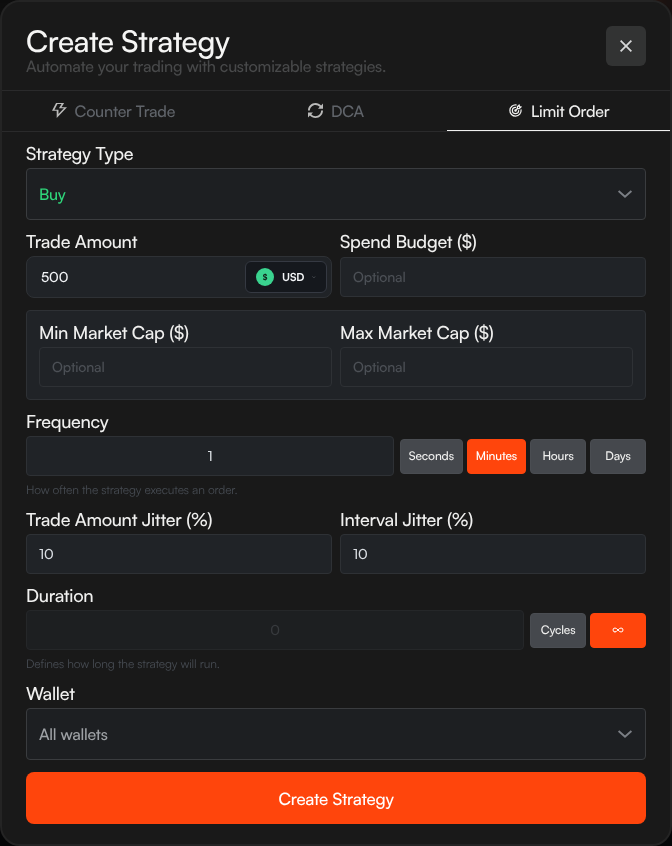
Trade Amount
The size of each individual trade. Select the unit: USD, Quote (e.g. SOL, WETH, WBNB), or Token.
Spend Budget
Optional maximum total amount to trade before the strategy stops. You can set the budget in USD, Quote, or Token units. Leave empty for no limit.
Market Cap Range
| Field | Description |
|---|---|
| Min Market Cap ($) | Strategy only executes when market cap is above this value (optional) |
| Max Market Cap ($) | Strategy only executes when market cap is below this value (optional) |
Set both for a range, or just one for a floor/ceiling trigger.
Examples:
- Buy when market cap drops below $1M: set Max to $1,000,000
- Sell when market cap exceeds $10M: set Min to $10,000,000
- Buy only between $500K–$1M: set Min to $500,000 and Max to $1,000,000
Frequency
How often the strategy executes while the market cap condition is met. Enter a number and select: Seconds, Minutes, Hours, or Days.
Jitter
| Field | Description |
|---|---|
| Trade Amount Jitter (%) | Randomizes trade size by this percentage |
| Interval Jitter (%) | Randomizes interval by this percentage |
Duration
- Cycles — Execute a fixed number of trades, then stop
- Infinite (∞) — Run indefinitely while conditions are met
Wallet
Choose which wallets execute the trades — all wallets, a wallet group, or an individual wallet.
Slippage
Set the maximum price movement Sumo should allow for each limit-order trade.
Private Relay
On supported EVM profiles, you can enable MEV protection using Private Relays. This routes eligible trades through private relays to reduce public mempool exposure.
Sell All Available Tokens
For Sell limit orders, you can enable Sell all available tokens on insufficient balance. If a planned sell is larger than the wallet's token balance, Sumo retries once using the wallet's available token balance.
Strategy List View
Active limit order strategies display:
| Column | Description |
|---|---|
| Trade Amount | Amount per trade with jitter range |
| Interval | Time between trades with jitter range |
| Duration | Cycles or ∞ |
| Budget | Circular gauge showing spend progress (spent / total budget) |
| Net Change | Cumulative base and quote asset changes |
Use Cases
- Buy the dip — Set a Buy limit order with a max market cap to accumulate when price drops
- Take profit — Set a Sell limit order with a min market cap to distribute tokens as price rises
- Range trading — Combine buy and sell limit orders at different market cap ranges to trade within a band
- Wallet cleanup — Use sell-all-on-insufficient-balance when a Sell limit order should clear smaller token balances without manual resizing