
Import Wallets
Add wallets to a trading profile using private keys, Wallet Farm, Wallet Marketplace, or another profile.

Use this page when you want to add wallets you already control to a trading profile. If you want to buy aged wallet inventory instead, see Wallet Marketplace.
Import via Private Keys
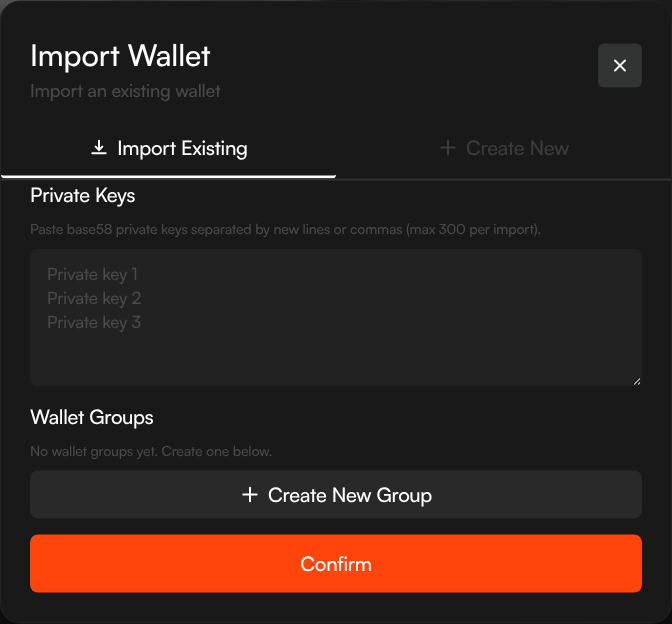
- Navigate to your profile's Wallets tab
- Click + New Wallets
- Select the Import Keys tab
- Paste your private keys — one per line, or comma-separated (up to 300)
- Optionally assign a wallet group
- Click Confirm
Sumo encrypts each private key and adds the wallets to your profile.
Import from Wallet Farm
Use this when you prepared wallets in Wallet Farm before the profile existed.
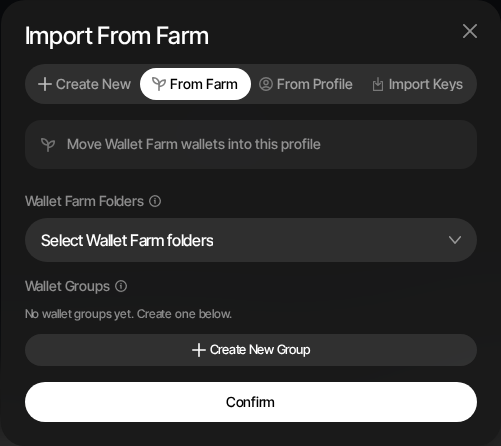
- Navigate to the target profile's Wallets tab
- Click + New Wallets
- Select the From Farm tab
- Choose one or more Wallet Farm folders
- Optionally assign the imported wallets to a wallet group or create a new group
- Click Confirm
Only active Wallet Farm wallets on the same chain are available for import.
Import via Seed Phrase
You can also import a seed phrase to derive wallets from it:
- Click + New Wallets → Create New tab
- Enter your existing seed phrase in the optional seed field
- Choose how many wallets to derive
- Click Confirm
Sumo derives wallets from your seed using the same BIP-44 HD derivation path it uses for generated seeds.
Key Security
Imported private keys and seed phrases are encrypted immediately using AES-256-GCM before storage. They never exist in plaintext in Sumo's database. See Security & Encryption for details.
Import from Another Profile
You can copy wallets from one profile to another within the same organization, without needing to re-enter private keys or seed phrases. This is useful when you want to reuse existing wallets across multiple token profiles — for example, using the same set of trading wallets on a new token launch.
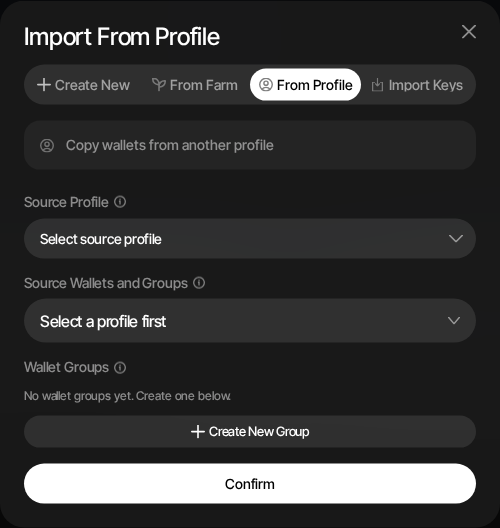
- Navigate to the target profile's Wallets tab
- Click + New Wallets
- Select the From Profile tab
- Choose a Source Profile from the dropdown — only profiles on the same network are shown
- Select source wallets, wallet groups, or all wallets from that profile
- Optionally assign the imported wallets to a wallet group on the target profile (or create a new one)
- Click Confirm
How It Works
Imported wallets are cloned into the target profile with an archived status. This means they won't participate in any active strategies until you explicitly activate them. Wallets that already exist in the target profile are skipped — no duplicates are created.
After import, you'll be redirected to the Archived tab where you can review and activate the imported wallets. Each import is recorded in the Audit Logs for traceability.