
Reporting
Audit Logs
Full audit trail of all sensitive operations in your organization.

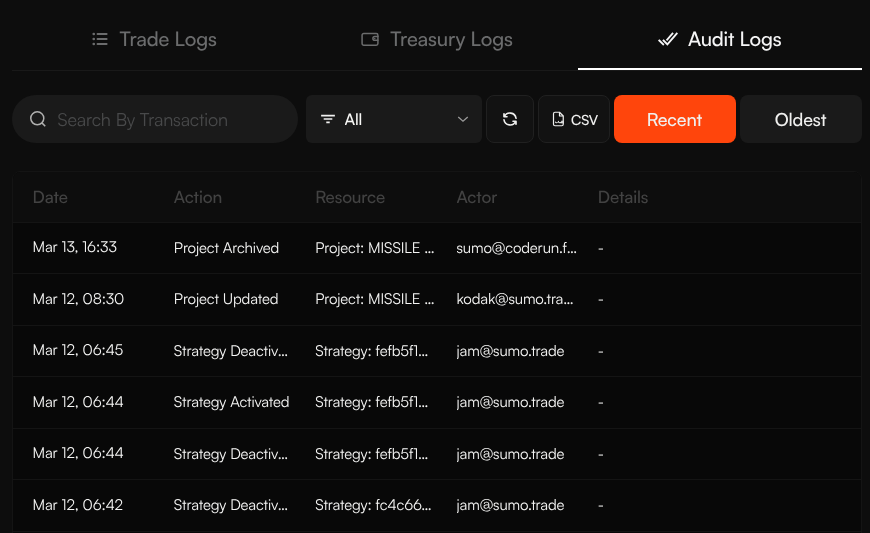
Audit Logs provide a complete trail of important profile and organization actions. Access them from the profile Logs view and select the Audit Logs tab.
The same Logs workspace also includes Trade Logs, Treasury Logs, and Launch Logs when available.
Columns
| Column | Description |
|---|---|
| Date | When the action occurred |
| Action | What was done (e.g. created, updated, deleted) |
| Resource | What was affected, such as a wallet, strategy, wallet group, or profile |
| Actor | Who performed the action |
| Details | Additional context about the change |
Filtering & Sorting
- Action filter — Show all actions or filter to specific action types
- Search — Search by transaction or log text when available
- Sort — Click sortable column headers such as Date, Action, Resource, Actor, or Details
- Order — Toggle between Recent (newest first) and Oldest (oldest first)
- Refresh — Reload the current log view
CSV Export
Click the CSV button to download audit logs for external review.
Pagination
Use the page controls at the bottom to move through older or newer log pages.
Use Cases
- Security review — Track who made changes and when
- Troubleshooting — Understand what changed before an issue occurred
- Team oversight — Monitor team member activity across the organization