
Wallet Farm
Manage wallets centrally, independent of any trading profile — fund them early, build on-chain history, and import them when you're ready to trade.

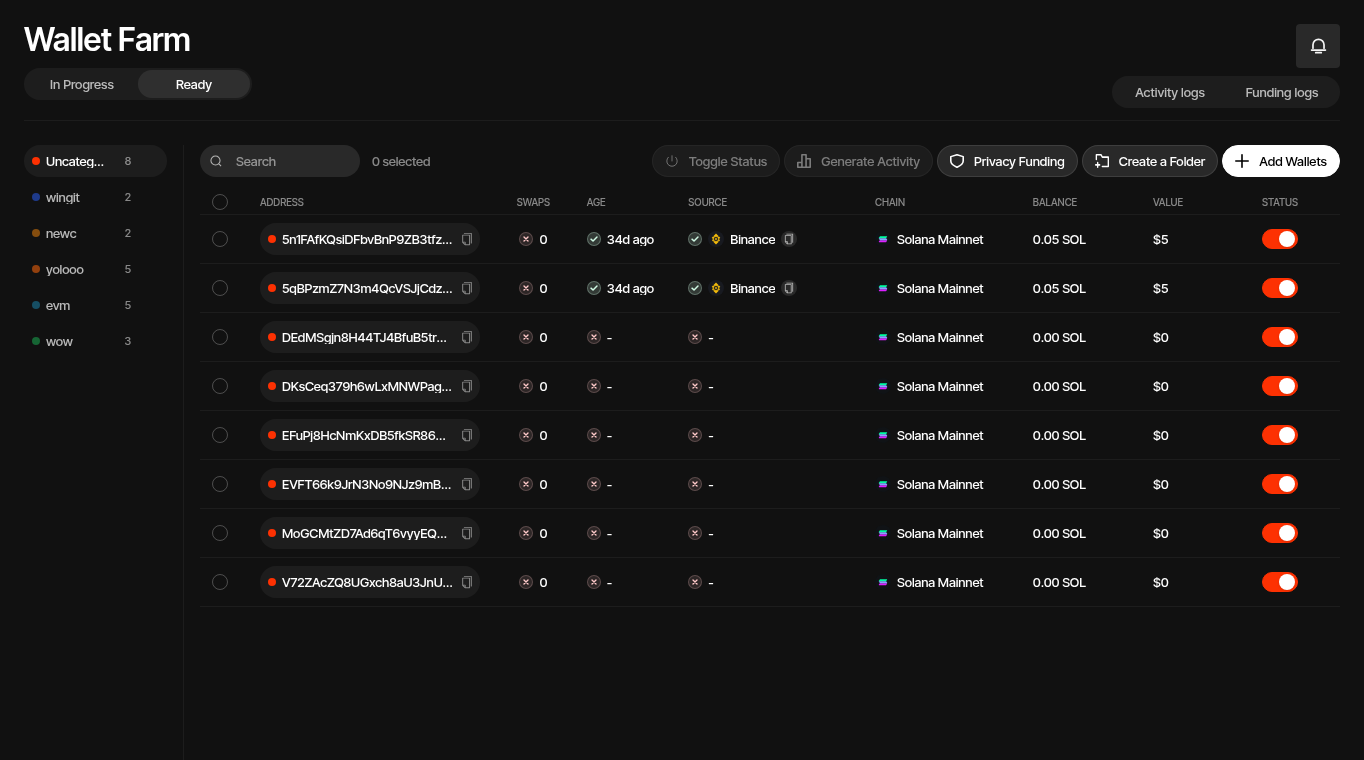
Wallet Farm is a centralized workspace for managing wallets outside the context of any specific trading profile. It is designed for teams that need to prepare wallets before a token launches — funding them, organizing them into folders, and building natural on-chain transaction history — so they are ready to import into a profile the moment trading begins.
Why Wallet Farm?
Trading profiles in Sumo are tied to a specific token and DEX pool, and a profile can only be created once that pool exists on-chain. For most token launches, this means you cannot set up wallets inside a profile until launch day.
Wallet Farm removes that constraint:
- Fund wallets early — Deposit native assets (SOL, ETH, etc.) days or weeks before a launch so wallets are ready to trade immediately.
- Build on-chain history — Use Generate Activity to execute real swaps on trending tokens, giving each wallet a natural transaction footprint.
- Distribute funds privately — Use Privacy Funding to fund multiple wallets from a single source without creating an obvious on-chain link between them.
- Move value across chains — Use Cross-Chain Swap to swap between two Wallet Farm wallets on different chains.
- Organize with folders — Group wallets by purpose, team, or strategy using color-coded folders.
- Import on launch day — When the token launches and a trading profile is created, import wallets from Wallet Farm into the profile in one step.
Pre-launch Profiles
For tokens launching on PumpFun, Sumo supports pre-launch profiles that let you set up wallets within a profile before the bonding curve completes. Wallet Farm is most useful for launches on other DEXes where pre-launch profiles are not available, or when you want to prepare wallets across multiple potential launches.
Dashboard Overview
The Wallet Farm page separates wallet preparation from operational logs:
| Tab | Description |
|---|---|
| In Progress | Wallets that still need more preparation before they are ready to import into a profile. |
| Ready | Wallets with stronger preparation signals, such as enough age, known funding source, and activity history. |
| Activity Logs | Audit trail of all activity generation runs — timestamps, wallet counts, swap outcomes. |
| Funding Logs | History of privacy funding sessions — provider, status, amounts, and deposit tracking. |
The toolbar provides quick access to the main operations:
- Add wallets — Generate new wallets or import existing ones
- Generate activity — Run token swaps to build on-chain history (requires wallet selection)
- Manage folders — Create and organize wallet folders
- Cross-Chain Swap — Move value between Wallet Farm wallets on different chains
- Privacy funding — Fund wallets via privacy-preserving providers
- Withdraw — Sweep native balances from selected wallets to a destination address (in the ⋯ menu)
- Filter folders — Filter the wallet table by folder
Wallet Table
Each wallet row shows:
| Column | Description |
|---|---|
| Name | Optional custom label. Click Add Name (or the current name) to set or clear it, the same way as profile wallets |
| Address | On-chain public address with folder color indicator |
| Swaps | Number of successful activity swaps completed by the wallet |
| Age | Time since the wallet was first funded |
| Source | Detected funding source, such as a known exchange, privacy provider, wallet, contract, or unknown source |
| Chain | Network the wallet belongs to (e.g., Solana Mainnet) |
| Balance | Native asset balance (SOL, ETH, etc.) |
| Value | USD value of native balance |
| Status | Active/inactive toggle |
Names follow wallets when they are imported between Wallet Farm and profiles in either direction, and the import pickers show a wallet's name with its address underneath. Wallets bought from the Marketplace arrive without names. Search also matches wallet names.
The readiness icons beside Swaps, Age, and Source make it easier to scan which wallets are ready to use. Green means the signal is strong, yellow means it is partially prepared, and red means the wallet still needs attention. Active wallets can be used for funding and activity operations; inactive wallets stay in Wallet Farm but are skipped by those actions.
Readiness Thresholds
Wallet readiness is based on the preparation signals shown in the table:
| Signal | Green | Yellow | Red |
|---|---|---|---|
| Swaps | At least 10 successful activity swaps | At least 5 successful activity swaps | Fewer than 5 successful activity swaps |
| Age | Funded at least 7 days ago | Funded at least 2 days ago | Funded less than 2 days ago, or funding date is missing |
| Source | Known exchange, exchanger, or privacy provider | Not used | Wallet, contract, unknown, or missing source |
Use these signals together. A wallet with good swap activity but an unknown funding source may still need review before it is imported into a profile.
Add Wallets
Generate new wallets or import existing ones into Wallet Farm.
Generate Activity
Build on-chain transaction history for your wallets.
Privacy Funding
Fund wallets privately using supported providers.
Cross-Chain Swap
Swap between Wallet Farm wallets on different chains.
Withdraw
Sweep native balances from farm wallets to a destination address.
Import to Profile
Move wallets from Wallet Farm into a trading profile.
Further Reading
- How to Launch a Memecoin in 2026 — where aged wallets fit into a launch plan
- The Memecoin Dictionary — bundling, sniping, and the other slang that describes what Wallet Farm prepares you for