
Treasury Dashboard
Overview of your treasury balances and wallet holdings.
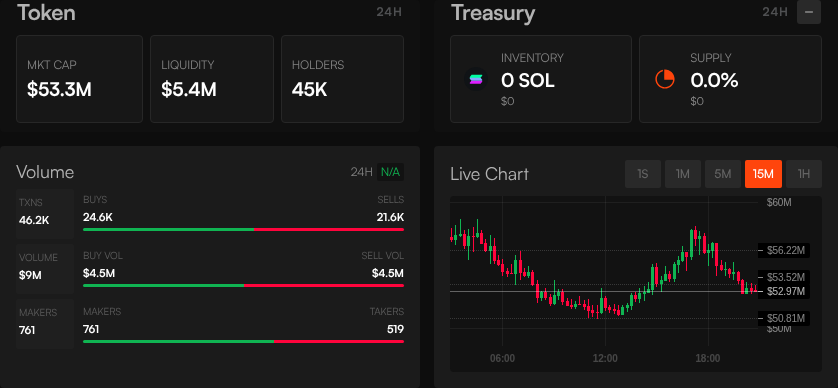
The Treasury Dashboard gives you a real-time view of a profile's market, treasury, and wallet state in one workspace. The top area shows the profile's live metrics and chart, while the wallet table below shows the wallets and actions used to manage funds.
Treasury Metrics
The header summarizes the profile's current treasury position:
| Metric | Description |
|---|---|
| Market Cap | Current market cap and token price |
| Token Supply | Percentage of total token supply held by the profile wallets, with USD value |
| Treasury (Native) | Total native asset balance across the profile wallets, with USD value |
| Treasury (Quote) | Total quote-token balance across the profile wallets, with USD value |
Click Refresh to update balances and treasury metrics manually.
Live Chart
The chart shows live price or market-cap action for the profile's pool. Use the interval buttons to change the candle size: 1s, 1m, 5m, 15m, 1h, or 4h.
You can also switch between chart overlays and views such as volume, market cap/price, and Sumo trade markers. This makes it easier to compare wallet inventory and strategy activity against market movement.
Wallet Table
The wallet table below the chart shows the wallets attached to the profile. Use it to inspect balances, select wallets, and run wallet actions.
| Area | Description |
|---|---|
| Wallet tabs | Switch between Active, Archived, and Excluded wallets |
| Search | Find a wallet by address or label |
| Balances | Review native, quote, and token balances with USD values |
| Supply | See each wallet's share of token supply and estimated value |
| Actions | Copy addresses, edit wallet groups, toggle wallet status, filter rows, create new wallets, or open treasury actions |
The totals row at the bottom summarizes the selected wallet view, including wallet count, balances, token holdings, and supply value.
Treasury and Wallet Actions
The profile workspace provides treasury operations through the Swap controls, Wallets toolbar, and wallet overflow menu:
- Withdraw - Send native assets, quote tokens, project tokens, or all balances to external destinations.
- Treasury Swap - Rotate treasury between native assets and supported stablecoins in either direction from the Swap modal.
- Cross-Chain Swap - Move value from a project wallet to an address on a different chain.
- Privacy Cashout - Distribute native assets or supported stablecoins through a privacy provider, using either a single source wallet or multiple source wallets.
- Wrap / Unwrap Native - Convert between the chain's native asset and wrapped native asset, such as SOL/WSOL or ETH/WETH.
- Swap Wallets - Rotate funds from selected wallets into fresh replacement wallets.
- Token Cleanup - Rebalance token holdings between wallet groups using direct transfers or buy/sell redistribution.
- Bubblemaps Analysis - Analyze holder clusters and optionally create wallet groups for matching Sumo wallets.
- Claim Creator Fees - Claim PumpFun/PumpSwap, Pons V2, or lunch.fun creator fees when the profile has an eligible creator wallet.
- Change Creator - Permanently route future PumpFun/PumpSwap creator fees to one wallet or a percentage split. Admin only.
- Claim LP Fees - Claim accrued liquidity-pool fees to the liquidity provider wallet for the profile's pool.
- Wallet management - Copy addresses, edit names or wallet groups, toggle status, filter rows, and add new wallets.
Claiming Fees
Two fee-claim actions live in the wallet actions menu when the profile is eligible:
- Claim Creator Fees — For PumpFun/PumpSwap launch profiles with an eligible creator wallet, and for Pons V2 and lunch.fun launches on Robinhood Chain. See Creator Fee Claims, Pons V2, and lunch.fun for details.
- Claim LP Fees — For profiles whose pool position accrues liquidity fees. Select the liquidity provider wallet for the pool and confirm; claimed fees land in that wallet and the claim is recorded in Treasury Logs.
Changing a Pump Creator
Admins can select Change creator for PumpFun and PumpSwap profiles to assign future creator fees to one recipient or split them between up to 10 recipients. The unique recipient shares must total exactly 100%, and the final split cannot be changed again after confirmation. See Changing the Creator for eligibility and graduated-pool requirements.
Withdraw
Withdraw funds from your wallets.
Privacy Cashout
Distribute funds through a privacy provider.
Treasury Swap
Rotate between native assets and stablecoins.
Cross-Chain Swap
Move funds to a wallet on another chain.
Wrap / Unwrap
Convert between native and wrapped assets.
Swap Wallets
Rotate funds into fresh wallets.
Token Cleanup
Rebalance token holdings between wallet groups.