
Withdraw
Withdraw funds from your Sumo wallets to external addresses.

Withdraw lets you send native assets, quote tokens, project tokens, or all balances from your Sumo wallets to one or more external destination addresses.
How to Withdraw
- Open the profile's Wallets tab and click Withdraw
- Select the source wallets — all wallets, a wallet group, or individual wallets
- Choose a destination mode (single or multi)
- Enter amounts and destination addresses
- Click Continue to review the transfer plan and network fees
- Click Withdraw to execute
Destination Modes
Single Destination
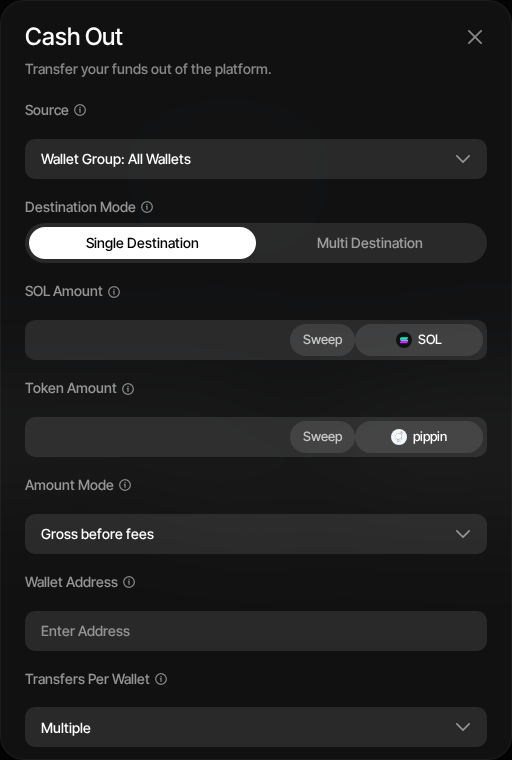
Send funds from your source wallets to a single external address:
- Enter the destination address
- Set the native amount (or toggle Sweep to send all available native balance)
- Select the token asset and set the token amount (or toggle Sweep to send all of that token)
- Choose whether entered amounts are gross before fees or net after fees
- Choose how transfers are grouped per source wallet
Multi Destination
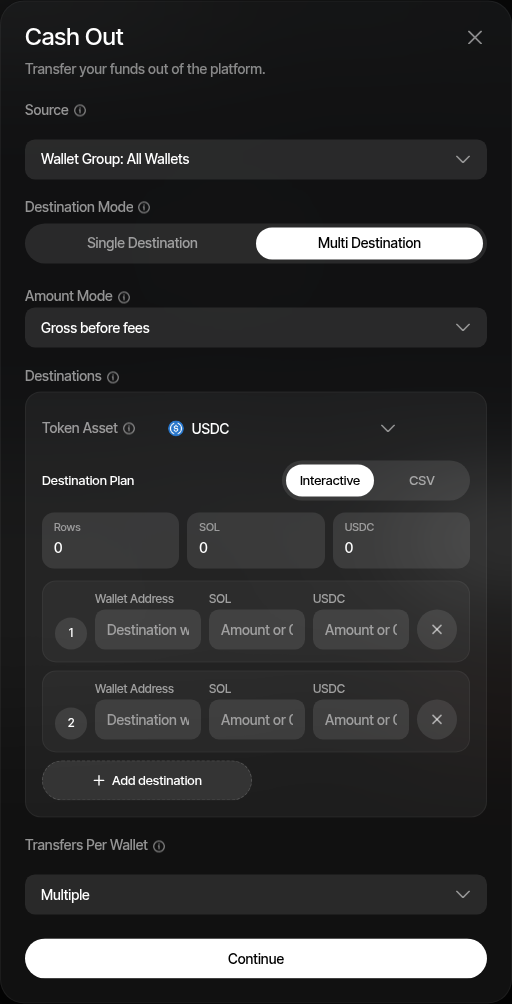
Send funds to multiple addresses in one operation:
- Interactive mode — Add destination rows with address, native amount, and token amount
- CSV mode — Paste destination rows in the same format:
address,nativeAmount,tokenAmount
Multi-destination withdrawals use explicit per-row amounts. Sweep is only available in Single Destination mode.
Distribution Strategy
The distribution strategy controls how the total amount is drawn from the selected source wallets:
| Strategy | Description |
|---|---|
| Rebalance | Default. Draws more from higher-balance wallets first so remaining balances even out |
| Pro-rata | Each source wallet contributes proportionally from its available balance |
| Even split | Each source wallet contributes the same amount |
| One to one | Each source wallet maps to one destination row. Not available together with Sweep, and limited to 200 destinations |
Transfer Batching
On Solana, the Transfer Batching setting chooses between Multiple (default) — consolidated transactions covering several source wallets — and Single — one transaction per source wallet. EVM and Tron withdrawals always send one transaction per source wallet.
Amount Modes
| Mode | Description |
|---|---|
| Gross (before fees) | The amount you enter is the total sent — applicable fees are deducted from it |
| Net (after fees) | The amount you enter is what the destination receives — applicable fees are added on top |
Destinations and Roles
Withdrawals support up to 2,000 destinations per request on Solana, 250 on EVM chains, and 200 on Tron.
Traders can withdraw to wallets managed by the same organization on the same chain. Withdrawing to external destination addresses requires the admin role or higher.
Withdrawing from a Launch Profile
Pre-launch profiles have a simplified Withdraw Funds dialog for recovering funds from launch wallets before trading opens. It sweeps the native asset — and the quote token where the launch uses one — from the selected wallets to a single destination address. Empty wallets are skipped.
The launch variant intentionally omits the full withdraw controls: there are no destination modes, distribution strategies, or amount modes. Select the source wallets, paste the destination, and confirm. For everything else on this page, use the regular Withdraw from an active profile.
Fees
No Withdrawal Platform Fee
Withdrawals do not have a Sumo platform fee. Source wallets still pay normal chain transaction fees. See Platform Fees for details.
The preview step shows the transfer plan and estimated network fees before you confirm.