
Account
Manage Users
Manage team members, roles, and permissions in your organization.

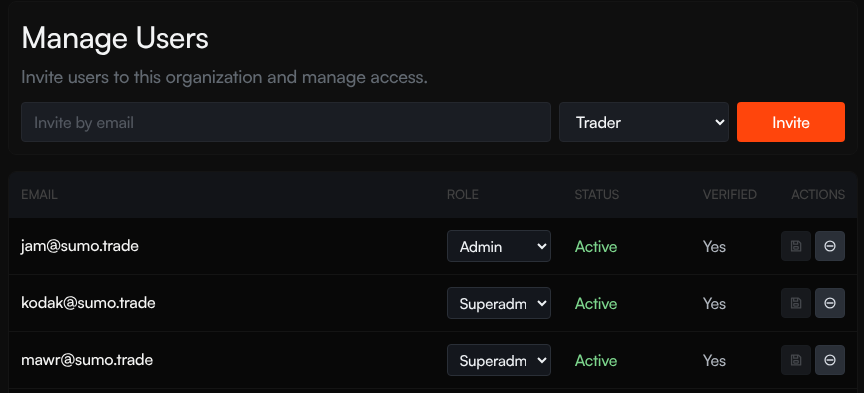
Manage your organization's team members from the Manage Users page. Invite new users, assign roles, and disable access when someone should no longer use the workspace.
Inviting Users
- Enter the user's email address
- Select a role from the dropdown
- Click Invite
The invited user receives an email with instructions to set up their account. Their status shows as Invite Sent until they complete signup.
Roles
| Role | Description |
|---|---|
| Admin | Full organization access, including users, settings, wallets, treasury operations, strategies, and trading |
| Trading Manager | Can manage trading users below them and operate trading workflows |
| Trader | Can manage strategies, execute trades, and work with profile wallets |
| Analyst | Read-only access for dashboards, reports, logs, and wallet balances |
The role options you can assign depend on your own role. Higher-privilege users can assign and manage more roles; lower-privilege users only see the roles they are allowed to manage.
User Table
The table shows all users in your organization:
| Column | Description |
|---|---|
| User | User's email address |
| Role | Current role (editable via dropdown) |
| Status | Active, Inactive, or Invite Sent |
| Actions | Save a role change or disable user access |
Manage Users
- Change role — Select a new role from the dropdown and click the save icon
- Disable user — Click the disable icon to revoke a user's access; this requires admin access
You cannot modify your own role or disable your own account.