
Telegram Bot
Monitor balances, receive alerts, and use Telegram for login verification.

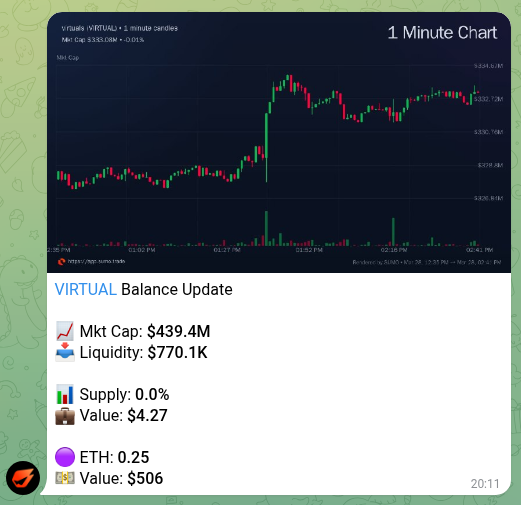
Sumo's Telegram bot lets you monitor profiles, check balances, receive real-time alerts, and use Telegram as a login verification channel.
Linking Your Account
- Go to Settings
- In the Telegram section, click Generate Link
- You'll receive a code and deep link — enter the code in the Sumo Telegram bot, or open the deep link directly
- Once linked, your Telegram username appears in Settings
Features
Balance Updates
Get balance summaries with a live price chart showing:
- Current market cap and liquidity
- Supply percentage and USD value of your holdings
- Native asset balance and value
- 1-minute candlestick chart
Trade Alerts
Receive real-time notifications for:
- Strategy trade executions (buys and sells)
- Instant Trade and Treasury Swap activity
- Withdraw and Privacy Swap completions
- Failed transactions or provider sessions
- Wallet events
- Profile and strategy events
Group Commands
Telegram groups can be linked to a Sumo profile so the team can check operating data without opening the app. A linked personal Telegram account with trader access or higher must run the setup commands.
| Command | Use |
|---|---|
/link <project-uuid> | Link the current group to a profile. |
/move_link <project-uuid> | Move an existing project link from another group to the current group. |
/unlink | Remove the current group's project link. |
/balance | Print the linked profile's balances and chart summary. |
/volume [all|organic|sumo] [24h|6h|1h|5m] | Show volume for the selected source and window, including total volume, buy volume, and sell volume. |
/preferences | Choose the stablecoin shown in /balance and the LP wallet used for eligible claim flows. |
/fees | Show claimable creator-fee or LP-fee amounts when supported. |
/claim | Submit a creator-fee or LP-fee claim for the linked profile. |
/timers | Schedule recurring group updates for supported commands. |
/alerts | Configure linked-group market alert delivery. |
/subscribe <project-uuid> | Subscribe the current group to trade notifications for a profile. |
/unsubscribe | Remove the current group's trade-notification subscription. |
/threshold <usd> | Set the minimum USD trade size for notification messages. |
Channels can also receive trade notifications when the bot has permission to post there. Use /subscribe_channel @channel <project-uuid> and /settings @channel from a direct message with the bot.
Two-Factor Authentication
Once your Telegram is linked, you can use it as your 2FA method:
- Go to Settings
- Change the Two Factor Authentication dropdown from Email to Telegram
- Future login challenges will be sent via Telegram instead of email
Unlinking
To disconnect Telegram, go to Settings and click Unlink Telegram. Your two-factor method will revert to email.