
Treasury Swap
Swap between native treasury assets, stablecoins, and a custom quote token in either direction.

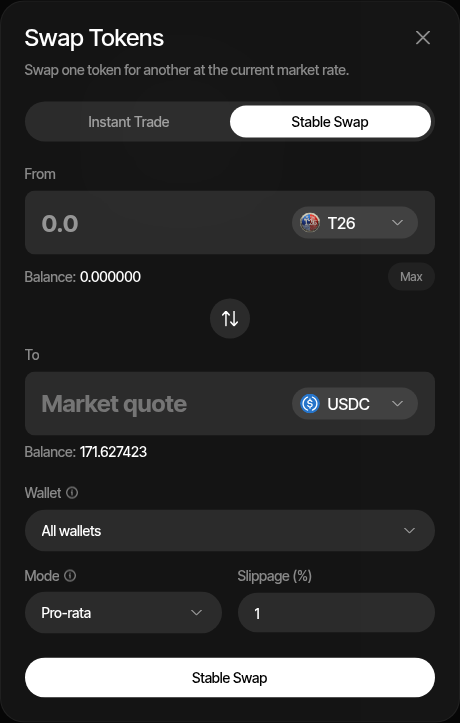
Treasury Swap helps you rotate treasury balances between a profile's native asset, supported stablecoins, and the profile's quote token. Use it when you want to derisk native exposure into stablecoins, move stablecoin balances back into SOL, ETH, BNB, or another native asset for trading and operations, or convert native into a custom quote token so buy strategies have something to spend.
When to Use It
- You want to derisk treasury balances after funding wallets or after a trading campaign
- You want to convert stablecoin treasury back into native assets before trading or funding gas-heavy operations
- You want stablecoin balances available on the same profile wallets
- Your profile trades against a custom quote token (for example a stock token on Robinhood Chain) and your wallets were funded with the native asset, so you need to convert some native into the quote before buys can run
- You want to rebalance selected wallets, one wallet group, or all active wallets
- You want Sumo to quote and execute the native-to-stable or stable-to-native route through the supported aggregator for the project chain
Treasury Swap is not a privacy tool. If you need to break the visible link between source and destination wallets, use Privacy Cashout instead.
Fees
Every treasury swap pays a Sumo platform fee of 0.5% (50 bps) by default, already reflected in the live quote. The fee is normally taken from the asset you sell; it is never taken from your project token, and some routes can only collect it from the asset you buy. Organizations can carry a different rate, and profiles in the custom-fee program can raise their own rate above the organization minimum from Profile Settings → Custom Fees. Launch funding and AutoFix refills that route through Treasury Swap pay the same fee. Tron swaps execute fee-free. Wallets that cannot cover their own gas swap through a gasless provider: on EVM chains that provider collects the same fee, while on Solana the gasless leg executes fee-free.
How to Use
- Open the profile's Wallets tab
- Click Swap
- Select the Treasury Swap tab
- Enter the amount
- Choose the From asset, then the To asset. The To list only offers assets that pair with your From choice; use the arrow button to reverse the pair
- Select the wallet target: all wallets, selected wallets, one wallet, or a wallet group
- Choose the allocation mode
- Review the live quote and click Treasury Swap
The quote refreshes while the payload is valid. After submission, Sumo records the action in Treasury logs and updates balances once the transaction flow completes.
Allocation Modes
| Mode | Description |
|---|---|
| Pro-rata | Pulls from the selected wallets proportionally based on available input balance. |
| Rebalance | Pulls more from higher-balance wallets first so the selected wallets end closer to the same remaining input balance. |
| Fixed per wallet | Uses the same input amount for each selected wallet. |
Use pro-rata when you want to rotate a total treasury amount across several wallets without changing the relative wallet weights too much. Use rebalance when one or more wallets are heavier and you want the swap to even out the remaining balances. Use fixed per wallet when each selected wallet should swap the same amount.
Supported Chains and Assets
Treasury Swap supports the native asset, the registered stablecoins for the project chain, and the profile's project and quote tokens. Every pair has exactly one stablecoin side, with one exception: a custom quote token (a quote that is neither a stablecoin nor the wrapped native asset) also pairs directly with the native asset, except on Tron. The From selector lists every asset with at least one valid partner, and the To selector lists only the assets that pair with it.
| Chain | Providers |
|---|---|
| Solana | Best (default), Jupiter, DFlow, OKX DEX |
| Ethereum, BNB Smart Chain, Base, Robinhood Chain | Best (default), 0x, Uniswap API |
| Ethereum Sepolia | Uniswap API |
| HyperEVM | 0x |
| Tron | SunSwap TRX/USDT pools |
Best quotes every provider available on the chain and executes through the one returning the most output. A provider that fails to quote is skipped, so a single provider outage does not block the swap. The quote row shows which provider was selected. Pick a specific provider to route through it exclusively.
Treasury Swap is not available on Stable Mainnet, where treasury balances are already stablecoin-denominated.
Examples:
- SOL to USDC on Solana
- USDC to SOL on Solana
- ETH to USDC on Ethereum or Base
- USDC to ETH on Ethereum or Base
- BNB to USDC or another supported stablecoin on BNB Smart Chain
- ETH to a custom quote token such as a stock token on Robinhood Chain, and back
- TRX to USDT on Tron
Logs and Confirmations
After you submit a treasury swap:
- Sumo submits the source transaction through the chain-specific execution path
- Treasury logs show the submitted action
- Balances refresh after confirmation
- Failed swaps show the parsed failure reason in logs when available