
Import an Existing Token
Add an existing on-chain token or pool to Sumo and create a trading profile for it.
Use Import Token when the token already exists on-chain, or when a liquidity pool already exists and you want Sumo to trade, monitor, and manage wallets for it.
This path creates a trading profile for an existing token. A trading profile defines which token you're trading, which chain and DEX to use, which wallets belong to the profile, and how Sumo should execute trades.
If you want Sumo to create and launch a brand-new token instead, start with Launch a New Token.
Import an Existing Token
- From the dashboard, click Import Token
- In Token Info, enter a profile name and paste your token's contract address or its pool address into Token or Pool Address
- Check the card under the field: Live means Sumo found the pool and the profile can trade; Draft means there is no pool yet
- Optionally add wallet sets in Wallet Setup: new wallets, imported keys, Wallet Farm wallets, wallets from another profile, or Wallet Marketplace wallets
- Optionally add starter strategies in Strategies
- Review the final preview and click Import
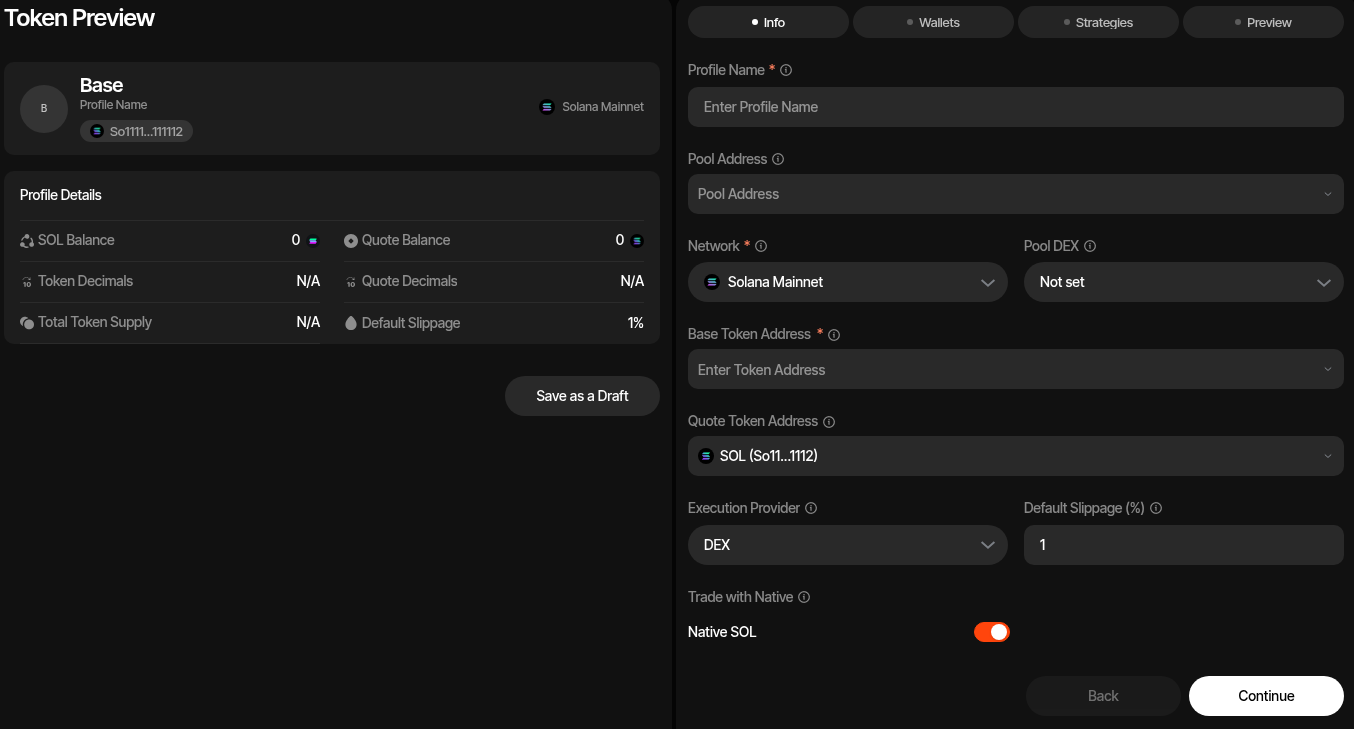
Flow
The import flow creates the trading profile and its initial wallet setup together. With a pool the profile is created Live and can trade. Without one it is saved as a Draft: you can add wallets and strategies, but nothing trades until you add the pool in Profile Settings. The card under the address field shows which one you are creating, and the line above Import repeats it before you finish.
Token Info
Paste one address into Token or Pool Address:
- Your token's contract address (CA): Sumo finds the token's pool and fills in the token, quote asset and DEX.
- A pool address: Sumo reads the token, quote asset and DEX from the pool.
The field shows the pair and DEX Sumo found, and the card under it shows the outcome: Live means the profile can trade as soon as it is created; Draft means it has no pool yet. Click Details on the card to see the full addresses with copy buttons: token and quote, plus the pool and DEX for a live profile. If Sumo finds no pool for the address, the card says so: if it is your token and it has no pool yet, click Use it as the token (Draft). If the token trades against a quote token Sumo cannot trade (for example one that runs extra code on every transfer), the card shows Not supported with the reason instead. A Pump.fun token, on its bonding curve or graduated to PumpSwap, can trade against a quote token that charges a fee on every transfer: Sumo sizes every trade net of that fee.
No token address yet? Click Start a draft. Sumo uses a placeholder pair (for example SOL/SOL on Solana, or the chain's default quote asset on chains without a wrapped native token) so you can set up the profile now; set the real token and pool in Profile Settings when the token is live.
For a draft with a token, Change quote sets a quote asset other than the chain's default. Choose DEX is optional: Sumo detects the DEX from the pool, but you can pick one to direct the lookup.
Wallet Setup
Wallet Setup decides which wallets are attached to the new profile. It is optional: you can import without wallets and add them later from the profile. Click Add wallets to add a wallet set, and add as many sets as you need, for example some wallets from one Wallet Farm folder, some from another, and a batch of new ones. Each set uses one source:
- Create New — Generate one or more new wallets
- From Farm — Move Wallet Farm wallets into this profile, or copy them with Keep in Wallet Farm
- From Profile — Copy wallets from another profile in the same organization
- Import Keys — Import existing private keys
- Marketplace — Buy new wallets from the Wallet Marketplace with your Sumo Balance
For From Farm and From Profile, leave Number of Wallets blank to add everything you selected, or enter a number to have Sumo pick that many at random when you import. Two sets drawing from the same folder always get different wallets.
Each set can create a new wallet group or join a group an earlier set created, so several sets can share one group. Groups are created with the import, and starter strategies can target any of them. Edit or remove a set from the list before importing. One import adds up to 500 wallets.
Nothing is created until you click Import. If the import fails partway, Sumo undoes it: Wallet Farm wallets go back to the farm and the half-created profile is removed.
Strategies
You can create Counter Trade, DCA, and Limit Order strategies before importing, by hand, from a strategy preset, or copied from another profile with From a profile… - Sumo ships built-in Hyped, Standard, and Staircase presets, and your org can save its own presets for reuse across launches and imports. Starter strategies are created inactive and target all wallets by default, so you can review wallet assignments and settings before activating them.
Profile Fields
Profile Name
Give your profile a descriptive name, e.g. "MYTOKEN Market Making" or "MYTOKEN DCA".
Pool Address
Paste the on-chain pool address (or pool ID) for your token's liquidity pool. Sumo automatically resolves the pool and fills in the DEX, base token, and quote token for you.
Smart Pool Resolution
When you paste a pool address, Sumo detects the DEX, identifies both tokens in the pair, and fetches token metadata (symbol, decimals, image) — all automatically.
Network
Select the blockchain network where your token lives. Sumo supports:
- Solana Mainnet
- Ethereum
- BNB Smart Chain
- Stable Mainnet
- Base
- Robinhood Chain
- Tron Mainnet
- Ethereum Sepolia (testnet)
Pool DEX
Automatically set when you resolve a pool address. You can also select manually. See Supported DEXes for the full list.
Base Token & Quote Token
These are resolved automatically from the pool address. The base token is your project's token and the quote token is the asset it's paired against (e.g. SOL, WETH, WBNB).
You can also enter token addresses manually if you're not using pool resolution.
Execution Provider
Choose how trades are routed:
- DEX (default) — Trades execute directly on the selected pool
- Aggregator — Trades route through a DEX aggregator for best-price execution (e.g. Jupiter, 0x). Some aggregators charge a small additional fee on top of the trade.
If your token trades on a single pool, DEX is recommended — it's direct and fee-free. If your token has significant liquidity across multiple pools, an Aggregator can find better prices through cross-pool routing, even accounting for the small additional fee.
See Supported Aggregators for available options per chain. Stable Mainnet and Tron have no aggregator integrations, so profiles on those chains always use direct DEX execution.
Default Slippage
Maximum slippage tolerance for trades, in percent. Default is 1%. Individual strategies can override this.
Trade with Native
When enabled, Sumo trades with the chain's native asset (SOL, ETH, BNB) instead of its wrapped version. Enabled by default.
Preview & Import
As you complete Token Info and Wallet Setup, the preview pane shows the profile summary that will be created:
- Token symbol, profile name, token address, quote address, pool address, and network
- Native balance and quote balance across the wallets selected for import (wallets Sumo picks at random are left out until the import picks them)
- Token and quote decimals
- Total token supply
- Default slippage
The final preview summarizes the profile, wallets, balances, and starter strategies. Review the details and click Import to finalize. You'll be taken to the Live Trading page for the new profile.