
Profile Settings
Configure slippage, strategy defaults, and MEV protection for your trading profile.
After creating your trading profile, you can configure default settings that apply across your strategies. These defaults save time when creating new strategies — you can always override them per-strategy.
Access profile settings from your profile page by clicking Settings in the navigation.
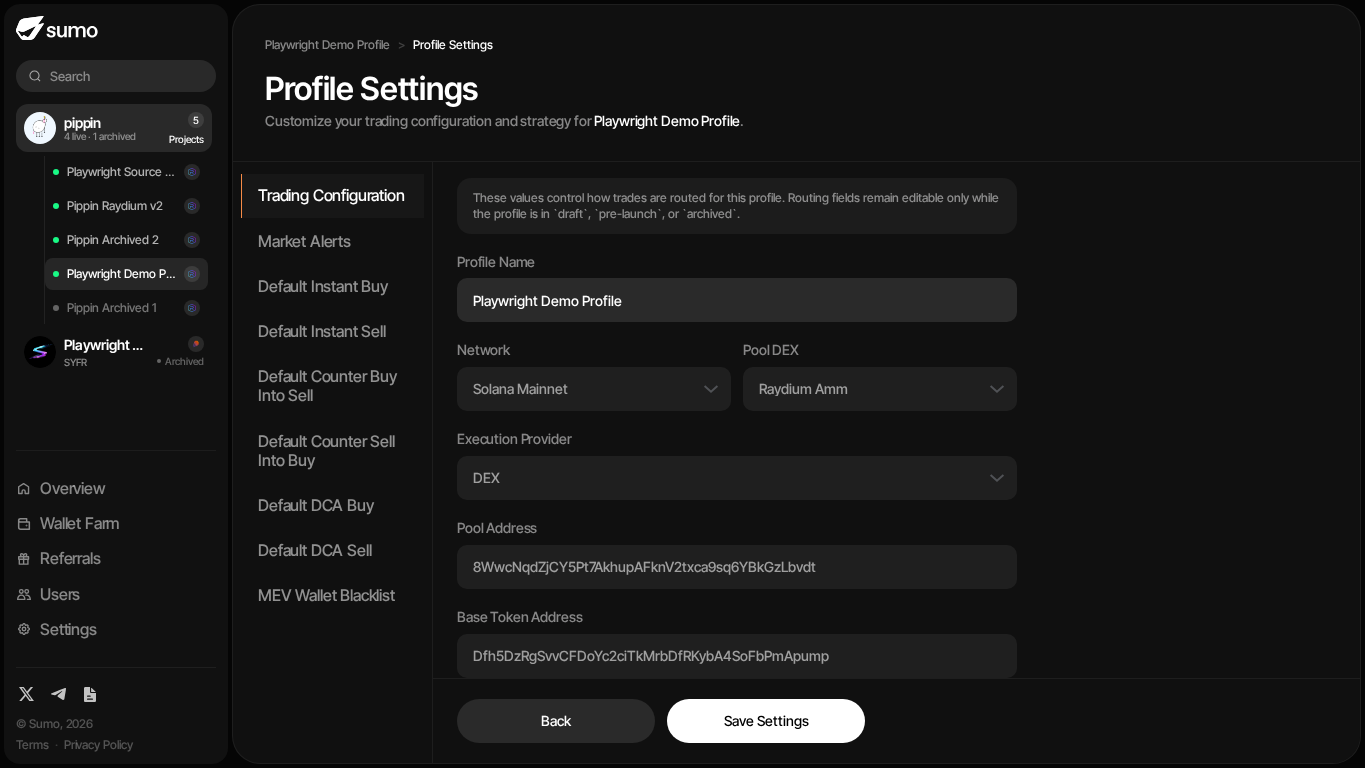
Settings are split into sections in the left pane. Each section can be edited independently and saved with Save Settings.
Trading Configuration
Trading Configuration controls profile routing, token metadata, and default execution behavior.
Routing fields such as Network, Pool DEX, Execution Provider, and Pool Address are editable only while the profile is in draft, pre-launch, or archived. Once a profile is active, token and route identity stays locked so strategies, reporting, and live trading remain consistent.
Read-only fields show the resolved base token, quote token, decimals, total supply, and circulating supply. Use Refresh Supply if the token supply metadata needs to be re-fetched.
Default Slippage (%)
Maximum slippage tolerance for trades, measured in basis points (bps) where 100 bps = 1%.
Individual strategies can override this default with their own slippage settings.
Slippage Warning
Too low — Trades will fail frequently, especially in volatile markets or low-liquidity pools.
Too high — You become an easy target for MEV bots (sandwich attacks), which profit by front-running your trades.
A range of 50–200 bps (0.5%–2%) works well for most tokens.
Trade with Native
When enabled, Sumo trades with the chain's native asset (SOL, ETH, BNB) instead of its wrapped version. Enabled by default.
Max Tx Retries
Number of times Sumo will retry a failed transaction before giving up. Default is 3.
Private Relay
For EVM profiles, private relay routes eligible trades through private execution paths for MEV protection.
Fee on Transfer
For EVM profiles, enable this when the traded token charges a transfer tax or similar fee.
Market Alerts
Market Alerts notify traders when market or social signals cross thresholds for the profile.
| Setting | Description |
|---|---|
| Alert Mode | Choose pump alerts, dump alerts, both directions, or off |
| Window (Minutes) | Rolling time window used to evaluate the alert |
| Price Move Threshold (%) | Price move required before an alert can trigger |
| Cooldown (Minutes) | Minimum time before another similar alert is sent |
| Min External Gross Volume ($) | External volume required inside the window before alerts fire |
| Social Alerts | Ingest qualified X posts for the token and notify traders when a cue matters |
The social link fields are read-only metadata resolved from token and pair sources. Use Refresh Socials to re-fetch them when the pool has updated metadata.
AutoFix
AutoFix controls the wallet-maintenance suggestions shown on the Live Trading page. It is designed for active DCA, Counter Trade, and Limit Order strategies where a wallet can become unusable because it is low on gas, low on quote asset for buys, or low on project token for sells.
| Setting | Description |
|---|---|
| Low gas | Shows wallets below the configured native-asset threshold and can suggest a treasury-swap gas refill or archival. |
| Low quote balance | Shows buy wallets that no longer have enough quote asset for the configured number of planned trades. |
| Low token balance | Shows sell wallets that no longer have enough project-token balance for the configured number of planned trades. |
| Low Gas Threshold | Native-asset balance where the wallet starts appearing as low gas. |
| Critical Gas Threshold | Lower native-asset balance that marks the wallet as urgent. |
| Gas Refill Amount ($) | Dollar amount of quote asset Sumo should swap per wallet when using AutoFix to refill gas. |
| Warning Trade Buffer | Number of minimum-size planned trades a wallet should be able to cover before it is warned. |
| Critical Trade Buffer | Lower buffer used to mark a wallet as critical. |
AutoFix suggests one of three fixes for each issue. Low-gas wallets can Refill gas by swapping some of a stablecoin quote into the native asset. Buy wallets that hold the native asset but not enough quote can Convert spare native into the quote token, which is how wallets funded with SOL, ETH, or BNB get their first balance of a custom or stablecoin quote. Wallets that cannot be fixed by a swap are offered Archive. A conversion only spends native that sits above the Native Refill Threshold plus the swap's own fees, so the wallet stays above the threshold after it runs.
Use AutoFix to keep strategy wallets operational without manually scanning every balance. It does not move funds automatically just because a warning appears; traders still choose whether to run the suggested fix.
Default Instant Buy / Sell Settings
Configure up to 6 presets each for instant buy and instant sell. Each preset defines an asset plus min and max amounts for quick one-click execution from the live trading page.
Presets can be denominated in USD, quote/native asset, or the profile token. Use the six slots to create different trade-size bands for quick buys and quick sells.
When you trigger an instant trade, Sumo picks a random amount between the preset's min and max to make the trade less predictable on-chain.
Organization defaults
A profile that has never saved its own Instant Buy or Instant Sell presets follows your organization's defaults, and the section shows which ranges are currently in effect. Admins set these under Settings → Organization → Instant Trade:
- Default — USD and token ranges used by every profile whose native currency has no set of its own. Only these units are offered here because they mean the same on every chain.
- SOL / ETH / BNB / HYPE / TRX — optional sets for profiles quoted in that native currency, which can also use native amounts (for example
0.5-1 SOL). One ETH set covers every ETH chain. Profiles quoted in a stablecoin or another token keep using Default.
If the organization has set nothing, the built-in $100-$300, $300-$500, and $500-$700 apply.
Organization defaults are inherited live: changing them updates the quick-trade buttons of every profile that has not saved its own presets. Saving a profile's Instant Buy or Instant Sell section keeps those ranges for that profile only, separately for each side. Reset to org defaults removes the profile's copy so it follows the organization again.
Default Counter Trade Settings
Defaults are configured separately for Default Counter Buy Into Sell and Default Counter Sell Into Buy strategies:
| Setting | Description |
|---|---|
| Trigger Asset | Asset used to express the trigger size, such as native, quote, token, or USD |
| Trigger Min | Minimum external trade size that triggers a counter trade |
| Trigger Max | Maximum external trade size to counter (leave empty for no cap) |
| Min Capture (%) | Minimum percentage of the detected trade to counter |
| Max Capture (%) | Maximum percentage of the detected trade to counter |
| MEV Exclusion | When enabled, automatically excludes known MEV bot wallets from triggering counter trades |
Default DCA Settings
Defaults for both DCA Buy and DCA Sell strategies:
| Setting | Description |
|---|---|
| Trade Asset | Asset used to express the per-trade amount, such as native, quote, token, or USD |
| Trade Amount | Amount per DCA trade |
| Interval (Seconds) | Time between each DCA trade |
| Timing Jitter (%) | Randomizes the interval by this percentage to make trade timing less predictable |
| Amount Jitter (%) | Randomizes the trade size by this percentage for the same reason |
Custom Fees
Organizations with negotiated fee and cashback terms can raise a profile's Sumo trading fees above the organization minimum.
| Setting | Description |
|---|---|
| Buy Fee (bps) | Sumo buy-side fee for this profile. Empty inherits the organization fee. |
| Sell Fee (bps) | Sumo sell-side fee for this profile. Empty inherits the organization fee. |
The section shows the effective buy fee, effective sell fee, and cashback percentage. Profile fees can only be raised above the organization minimum, and the organization cashback percentage is unchanged by profile overrides.
Custom Fees is visible only to org admins, and only when the organization has custom fee and cashback terms configured.
Custom Tokens
The Custom Tokens section manages the allowlist behind Custom Swap. Each entry is a token address the profile's wallets are allowed to trade against known assets. Admins add tokens here or inline from the Custom Swap tab; removal is settings-only, so a token cannot be dropped mid-trade. Removing a token hides it from the swap selector but does not touch existing balances.
MEV Wallet Blacklist
Manage wallets that should be ignored by your counter-trade strategies. This prevents your bot from counter-trading against known MEV bots or other wallets you want to exclude.
- Manual — Add wallet addresses directly, one per line
- Auto — Wallets added automatically by your counter-trade strategies over time as they detect MEV activity
The blacklist shows counts for manual, auto, and total blocked wallets.
Client Portal
Client Portal creates a shareable read-only link for selected profile views. It is useful when a founder or market-making lead wants to show stakeholders the current trading workspace without giving them login access or permission to trade.
When enabled, you can:
- Copy the Client Portal link
- Rotate the link to invalidate older links
- Choose which read-only views are available, such as Trading, Strategies, Insights, Wallets, Surveillance, Logs, and Team Notes
Anyone with the active link can view the selected tabs, but trading, withdrawals, wallet edits, strategy edits, and profile settings remain disabled.